# In-Depth: Deploy with SGLang
In this tutorial, we will deploy a [SGLang](https://docs.sglang.ai/) endpoint hosting `deepseek-ai/deepseek-llm-7b-chat` large language model. [SGLang](https://docs.sglang.ai/) is one of the leading libraries for LLM-serving and inference, supporting [many architectures](https://docs.sglang.ai/references/supported_models.html) and models that use them.
You can find more information about the model itself from the [Hugging Face model hub](https://huggingface.co/deepseek-ai/deepseek-llm-7b-chat).
## Prerequisites
For this example you need a Python environment running on your local machine, a Hugging Face account to create a Hugging Face token that is used to fetch the model weights and Verda cloud account to create a deployment.
## Model Weights
[SGLang](https://docs.sglang.ai/) deployment fetches the model weights from Hugging Face.
In this tutorial we are loading `deepseek-ai/deepseek-llm-7b-chat` model.
{% hint style="success" %}
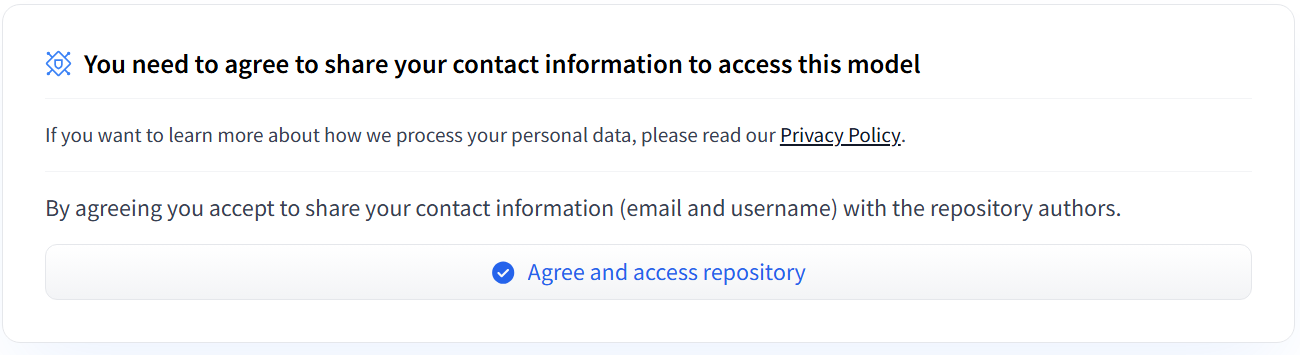
Some models on Hugging Face require the user to accept their usage policy, so please verify this for any model you are deploying. If you have not Agreed to the policy previously, you will see a similar dialog on the model page on Hugging Face:
{% endhint %}
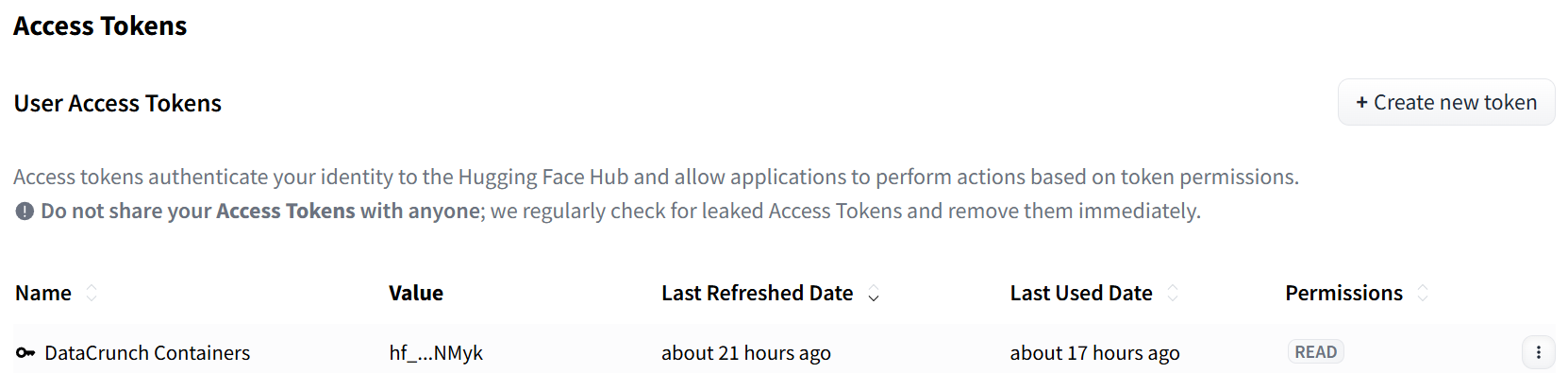
You will also require the `User Access Token` in order to fetch the weights. You can obtain the Access Token in your [Hugging Face account](https://huggingface.co/) by clicking the Profile icon (top right corner) and selecting **Access Tokens**.
For deploying the [SGLang](https://docs.sglang.ai/) endpoint, the `READ` permissions are sufficient.
Hugging Face Access Tokens panel
{% hint style="success" %}
Please store the obtained token safely. You will need it for the next steps!
{% endhint %}
## Create the deployment
In this example, we will deploy `deepseek-ai/deepseek-llm-7b-chat` on a General Compute (24 GB VRAM) GPU type. For larger models, you may need to choose one of the other GPU types we offer.
1. Log in to the [Verda cloud console](https://console.verda.com/signin)
2. Create a new project or use existing one, open the project
3. On the left you'll see a navigation menu. Go to **Containers -> New deployment.** Name your deployment and select the Compute Type.
4. We will be using the official [SGLang Docker image](https://hub.docker.com/r/lmsysorg/sglang), set **Container Image** to `docker.io/lmsysorg/sglang:v0.4.1.post6-cu124` You can select another version from the list if you prefer, or leave the version out of the url given and select the one that you wish to use. For this example we use `v0.4.1.post6-cu124`.
5. Toggle on the **Public** location for your image. You can use the **Private** if you have a private registry, paired with credentials. For this example we use the public registry.
6. Make sure your preferred tag is selected
7. Set the Exposed HTTP port to `30000`
8. Set the Healthcheck port to `30000`
9. Set the Healthcheck path to `/health`
10. Toggle **Start Command** on
11. Add the following parameters to **CMD**: `python3 -m sglang.launch_server --model-path deepseek-ai/deepseek-llm-7b-chat --host 0.0.0.0 --port 30000 --model-loader-extra-config '{"enable_multithread_load": true}'`
12. Add your Hugging Face User Access Token to the **Environment Variables** as `HF_TOKEN`. Note that in some examples you might see `HUGGING_FACE_HUB_TOKEN` environment variable used. The `HF_TOKEN` is the new name for the environment variable. The old name `HUGGING_FACE_HUB_TOKEN` is still supported, but going forwards we recommend using the new name.
13. **Deploy container**
(You can leave the **Scaling** options to their default values, however if you wish to enable LLM batching, you can set the **Concurrent requests per replica** option to a value greater than 1. This number represents the number of concurrent requests the deployment accepts)
That's it! You have now created a deployment. You can check the logs of the deployment from the logs tab. When the deployment starts it'll download the model weights from Hugging Face and start the SGLang server. This will take few minutes to complete.
{% hint style="warning" %}
For production use, we recommend authenticating/using private registries to avoid potential rate limits imposed by public container registries.
{% endhint %}
## Accessing the deployment
Before you can connect to the endpoint, you will need to generate an authentication token, by going to **Credentials -> Inference API Keys**, and click **Create.**
The **base endpoint URL** for your deployment is in the **Containers API** section in the top left of the screen. This will be in the form of: `https://containers.datacrunch.io//`
### Test Deployment
Once the deployment has been created and is ready to accept requests, you can test that it responds correctly by sending a `get model info` request to the endpoint.
[SGLang](https://docs.sglang.ai/) can be deployed as a server that implements the [OpenAI API protocol](https://platform.openai.com/docs/api-reference/introduction). This allows SGLang to be used as a replacement for applications using OpenAI API. More information about [SGLang](https://docs.sglang.ai/) in general and available endpoints can be found in the [official documentation of SGLang](https://docs.sglang.ai/)
Below is an example cURL command for running your test deployment:
{% hint style="info" %}
Notice the added subpath `/get_model_info` to the base endpoint URL
{% endhint %}
```bash
#!/bin/bash
curl -X GET /get_model_info \
--header 'Authorization: Bearer ' \
--header 'Content-Type: application/json'
```
This should return a response that shows `deepseek-ai/deepseek-llm-7b-chat` model is available for use.
```json
{
"model_path": "deepseek-ai/deepseek-llm-7b-chat",
"tokenizer_path": "deepseek-ai/deepseek-llm-7b-chat",
"is_generation": true
}
```
## Sending inference requests
As the `get model info` request show us `deepseek-ai/deepseek-llm-7b-chat`, we are ready to send an inference requests to the model.
### Completions API
CompletionsAPI `/v1/completions` offers a quick way to get completions for a given prompt.
#### Synchronous request
Below is a Python script that calls the completions endpoint `/v1/completions` with a prompt and returns the completion. Save it to a file named `test_request.py` and run it with `python test_request.py`. Remember to replace `` and `` with the values from your deployment.
```python
import requests
import sys
import signal
def graceful_shutdown(signum, frame) -> None:
print(f"\nSignal {signum} received at line {frame.f_lineno} in {frame.f_code.co_filename}")
sys.exit(0)
def do_test_request() -> None:
url = '/v1/completions'
headers = {
'Content-Type': 'application/json',
'Authorization': 'Bearer ',
}
data = {
"model": "deepseek-ai/deepseek-llm-7b-chat",
"prompt": "The sun is a star. Explain to me the concept of solar wind.",
"max_tokens": 128,
"temperature": 0.7,
"top_p": 0.9
}
response = requests.post(url, headers=headers, json=data)
if response.status_code == 200:
try:
print(response.json())
except ValueError:
print("Response content is not valid JSON.", file=sys.stderr)
print("Response body:", file=sys.stderr)
print(response.text, file=sys.stderr)
else:
print(f"Request failed with status code {response.status_code}", file=sys.stderr)
print("Response body:", file=sys.stderr)
print(response.text, file=sys.stderr)
if __name__ == "__main__":
signal.signal(signal.SIGINT, graceful_shutdown)
signal.signal(signal.SIGTERM, graceful_shutdown)
do_test_request()
```
**Response**
This returns a synchronous response with the completion of the prompt:
```json
{
"id": "6c58bd409e114c9e9a146d46abe14da3",
"object": "text_completion",
"created": 1737390819,
"model": "deepseek-ai/deepseek-llm-7b-chat",
"choices": [
{
"index": 0,
"text": ", we can learn about the sun itself. By studying its interactions with Earth, we can learn about the Earth's magnetosphere. By studying its interactions with other planets, we can learn about the atmospheres of those planets.\n\n## Solar wind\n\nThe Sun is a hot, gaseous body. The solar wind is the stream of charged particles (mostly electrons and protons) that continuously flows from the Sun into space. The solar wind is created by the Sun's magnetic field, which exerts a force on the charged particles in the solar atmosphere, the corona, and propels them",
"logprobs": "None",
"finish_reason": "length",
"matched_stop": "None"
}
],
"usage": {
"prompt_tokens": 14,
"total_tokens": 142,
"completion_tokens": 128,
"prompt_tokens_details": "None"
}
}
```
#### Streaming request
Same example as above, but streaming out the response. Save it to a file named `test_request.py` and run it with `python test_request.py`.
```python
import requests
import sys
import signal
def graceful_shutdown(signum, frame) -> None:
print(f"\nSignal {signum} received at line {frame.f_lineno} in {frame.f_code.co_filename}")
sys.exit(0)
def do_test_request() -> None:
url = '/v1/completions'
headers = {
'Content-Type': 'application/json',
'Authorization': 'Bearer ',
'Accept': 'text/event-stream',
'Cache-Control': 'no-cache',
'Connection': 'keep-alive',
}
data = {
"model": "deepseek-ai/deepseek-llm-7b-chat",
"prompt": "Solar wind is a curious phenomenon. Tell me more about it",
"max_tokens": 128,
"temperature": 0.7,
"top_p": 0.9,
"stream": True
}
try:
with requests.post(url, headers=headers, json=data, stream=True) as response:
if response.status_code == 200:
print("Stream started. Receiving events...\n")
for line in response.iter_lines(decode_unicode=True):
if line:
print(line)
else:
print(f"Request failed with status code {response.status_code}", file=sys.stderr)
print("Response body:", file=sys.stderr)
print(response.text, file=sys.stderr)
except requests.RequestException as e:
print(f"An error occurred: {e}", file=sys.stderr)
if __name__ == "__main__":
signal.signal(signal.SIGINT, graceful_shutdown)
signal.signal(signal.SIGTERM, graceful_shutdown)
do_test_request()
```
**Response**
This returns a streaming response with the completion of the prompt:
```
Stream started. Receiving events...
event:response
data:{"id":"650316349c7640b49e700e1d617a0298","object":"text_completion","created":1737390888,"model":"deepseek-ai/deepseek-llm-7b-chat","choices":[{"index":0,"text":",","logprobs":null,"finish_reason":"","matched_stop":null}],"usage":null}
event:response
data:{"id":"650316349c7640b49e700e1d617a0298","object":"text_completion","created":1737390888,"model":"deepseek-ai/deepseek-llm-7b-chat","choices":[{"index":0,"text":" scientists","logprobs":null,"finish_reason":"","matched_stop":null}],"usage":null}
event:response
data:{"id":"650316349c7640b49e700e1d617a0298","object":"text_completion","created":1737390888,"model":"deepseek-ai/deepseek-llm-7b-chat","choices":[{"index":0,"text":" can","logprobs":null,"finish_reason":"","matched_stop":null}],"usage":null}
event:response
data:{"id":"650316349c7640b49e700e1d617a0298","object":"text_completion","created":1737390888,"model":"deepseek-ai/deepseek-llm-7b-chat","choices":[{"index":0,"text":" learn","logprobs":null,"finish_reason":"","matched_stop":null}],"usage":null}
...
```
### Chat Completions API
The chat completions API `/v1/chat/completions` is a more dynamic, interactive way to communicate with the model, allowing back-and-forth exchanges that can be stored in the chat history. Notice that the prompt format is different from the completions API.
#### Synchronous request
Below is a Python script that calls the chat completions endpoint `/v1/chat/completions` with a prompt and returns the completion. Save it to a file named `test_request.py` and run it with `python test_request.py`. Remember to replace `` and `` with the values from your deployment.
```python
import requests
import sys
import signal
def graceful_shutdown(signum, frame) -> None:
print(f"\nSignal {signum} received at line {frame.f_lineno} in {frame.f_code.co_filename}")
sys.exit(0)
def do_test_request() -> None:
url = '/v1/chat/completions'
headers = {
'Content-Type': 'application/json',
'Authorization': 'Bearer ',
}
data = {
"model": "deepseek-ai/deepseek-llm-7b-chat",
"messages":[
{"role": "user", "content": "What is deep learning?"}
],
"stream":False
}
try:
with requests.post(url, headers=headers, json=data, stream=False) as response:
print(response.json())
except requests.RequestException as e:
print(f"An error occurred: {e}", file=sys.stderr)
if __name__ == "__main__":
signal.signal(signal.SIGINT, graceful_shutdown)
signal.signal(signal.SIGTERM, graceful_shutdown)
do_test_request()
```
**Response**
This returns a synchronous response with the completion of the prompt:
```json
{
"id": "a7b3da6782be47dcb9101714911c9edd",
"object": "chat.completion",
"created": 1737390976,
"model": "deepseek-ai/deepseek-llm-7b-chat",
"choices": [
{
"index": 0,
"message": {
"role": "assistant",
"content": " Deep learning is a subset of machine learning that is based on artificial neural networks with many layers (hence deep). These networks are designed to simulate the way a brain analyzes and processes information. Deep learning algorithms automatically and adaptively learn to represent data by training on large amounts of data and using a process called backpropagation to iteratively refine the learning.\n\nDeep learning models are used for a wide range of applications, including image and speech recognition, natural language processing, and autonomous vehicles, among others. They have been instrumental in achieving state-of-the-art results in many areas of artificial intelligence, thanks to their ability to learn complex patterns and relationships in data.",
"tool_calls": "None"
},
"logprobs": "None",
"finish_reason": "stop",
"matched_stop": 2
}
],
"usage": {
"prompt_tokens": 8,
"total_tokens": 150,
"completion_tokens": 142,
"prompt_tokens_details": "None"
}
}
```
#### Streaming request
Same example as above, but streaming out the response. Save it to a file named `test_request.py` and run it with `python test_request.py`.
```python
import requests
import sys
import signal
def graceful_shutdown(signum, frame) -> None:
print(f"\nSignal {signum} received at line {frame.f_lineno} in {frame.f_code.co_filename}")
sys.exit(0)
def do_test_request() -> None:
url = '/v1/chat/completions'
headers = {
'Content-Type': 'application/json',
'Authorization': 'Bearer ',
'Accept': 'text/event-stream',
'Cache-Control': 'no-cache',
'Connection': 'keep-alive',
}
data = {
"model": "deepseek-ai/deepseek-llm-7b-chat",
"messages":[
{"role": "user", "content": "What is deep learning?"}
],
"stream":True,
"stream_options": {
"include_usage": True
},
"temperature": 0.8,
"top_p": 0.95
}
try:
with requests.post(url, headers=headers, json=data, stream=True) as response:
if response.status_code == 200:
print("Stream started. Receiving events...\n")
for line in response.iter_lines(decode_unicode=True):
if line:
print(line)
else:
print(f"Request failed with status code {response.status_code}", file=sys.stderr)
print("Response body:", file=sys.stderr)
print(response.text, file=sys.stderr)
except requests.RequestException as e:
print(f"An error occurred: {e}", file=sys.stderr)
if __name__ == "__main__":
signal.signal(signal.SIGINT, graceful_shutdown)
signal.signal(signal.SIGTERM, graceful_shutdown)
do_test_request()
```
**Response**
This returns a streaming response with the completion of the prompt.
```
Stream started. Receiving events...
event:response
data:{"id":"fb7bb0fbd2ee4316b041f03a71264597","object":"chat.completion.chunk","created":1737390987,"model":"deepseek-ai/deepseek-llm-7b-chat","choices":[{"index":0,"delta":{"role":"assistant","content":""},"logprobs":null,"finish_reason":"","matched_stop":null}],"usage":null}
event:response
data:{"id":"fb7bb0fbd2ee4316b041f03a71264597","object":"chat.completion.chunk","created":1737390987,"model":"deepseek-ai/deepseek-llm-7b-chat","choices":[{"index":0,"delta":{"role":null,"content":" Deep"},"logprobs":null,"finish_reason":"","matched_stop":null}],"usage":null}
event:response
data:{"id":"fb7bb0fbd2ee4316b041f03a71264597","object":"chat.completion.chunk","created":1737390987,"model":"deepseek-ai/deepseek-llm-7b-chat","choices":[{"index":0,"delta":{"role":null,"content":" learning"},"logprobs":null,"finish_reason":"","matched_stop":null}],"usage":null}
...
```
## Conclusion
This concludes our tutorial how to call the [SGLang](https://docs.sglang.ai/) endpoint with `deepseek-ai/deepseek-llm-7b-chat` model. You can now use the [SGLang](https://docs.sglang.ai/) endpoint to generate completions for your prompts.
Also check out also other [SGLang](https://docs.sglang.ai/) standard endpoints such as `/health` or `/get_server_info` to monitor the health of the deployment.