General Release Notes
New platform features and capabilities, hardware availability, and new locations, with the newest updates listed first.
November 2026
Improvements
DeepSeek V4.1 Flash 1017 on Verda Inference
DeepSeek V4.1 Flash 1017 is now available on Verda Inference. DeepSeek's fast, low-cost model takes text and image input, works with up to 1M tokens of context, and reasons before it answers when you set reasoning_effort. It runs in Germany. Enable it under Inference > Models in the console.
This is the last model we announce in the release notes. New models will appear in the console under Inference > Models, and in the models list.
New products
Verda Inference (Preview)
Verda Inference is now available in preview. Call hosted open models through an OpenAI-compatible API at https://inference.verda.com/v1, and pay per token with no GPUs to deploy or manage. The first model is Kimi K3.1 Pro, Moonshot AI's 3T-class model with a 1M-token context window, image input and configurable reasoning effort, running in Germany.
Go to Inference > Models in the console and enable a model: you get an inference API key straight away, and can try the model in the Playground. The API serves Chat Completions and Responses, so OpenAI SDKs and coding agents such as OpenCode, Pi and Codex work with a base URL change. Prompts and responses aren't stored or used for training. Read the Verda Inference documentation.
October 2026
New products
Private Networks (Beta)
Private Networks are now available in Beta. A private network gives your project its own isolated IPv4 address space: instances attached to it talk to each other over private addresses that are never routed on the public internet and are not reachable from any other customer's network.
Create networks and subnets with the CIDR ranges you choose, then pick Public + Private IP or Private IP only in the Network step when you deploy an instance. Public IPs are delivered as 1:1 NAT to the instance's private address, and private-only instances can reach the internet through a route via an instance you run.
The Beta is available in the FIN-03 location. Select the Private networks filter on the deploy page to see supported instance types. Read the Private Networks documentation.
Sign in with Microsoft Entra ID (SSO)
You can now sign in to the Verda console with your Microsoft Entra ID account.
Link Microsoft Entra ID to your Verda account once before your first Microsoft Entra ID sign-in: sign in with your email and password, then go to My Account > Linked accounts and link your Microsoft Entra ID account. After that, Sign in with Microsoft Entra ID works straight from the login page, and you can unlink it from the same Linked accounts page.
Changes
Delete your account from the console
You can now delete your Verda account yourself from Account settings > Account, without contacting Support. Remove the resources from the projects you own, confirm with your password, then open the link we email you. Any remaining balance is refunded to your card automatically. See Delete your account.
September 2026
New products
Sign in with GitHub (SSO)
You can now sign in to the Verda console with your GitHub account.
Link GitHub to your Verda account once before your first GitHub sign-in: sign in with your email and password, then go to My Account > Linked accounts and link your GitHub account. After that, Sign in with GitHub works straight from the login page, and you can unlink GitHub from the same place.
Changes
Non-root GPU profiling on instances
New instance images let any user on the instance read NVIDIA GPU hardware performance counters, so NVIDIA Nsight Systems and Nsight Compute run without sudo. This applies to the current Ubuntu 24 and 26 images.
August 2026
New products
Resource quotas
Every Verda account now has a Quotas page in the console, where you can see the limits that apply to your account and request increases yourself.
Quotas cover GPUs, Spot GPUs, vCPUs, NVMe storage, storage items, and projects. Go to Account settings > Quotas to view your usage and limits, request an increase, and track your requests. Requests are typically reviewed within one business day. Read the quotas documentation.
Changes
Confidential Computing is now generally available.
July 2026
New products
Sign in with Google (SSO)
You can now sign in to the Verda console with your Google account.
Link Google to your Verda account once before your first Google sign-in: sign in with your email and password, then go to My Account > Linked accounts and link your Google account. After that, Sign in with Google works straight from the login page, and you can unlink Google from the same place whenever you want.
Audit logs
The project audit logs is now available in the console and via the public API. Audit logs give you a record of who did what in a project, when, and from where, using the CloudEvents 1.0 JSON format. Events use the CloudEvents JSON format, cover the last 90 days, and can be read through the API or exported as a JSON file. Only the project owners and admin members have access. Read the audit log documentation.
Changes
Storage sizes now use binary units
Storage capacity is now expressed in binary units (gibibytes, GiB, and tebibytes, TiB) instead of decimal units (gigabytes, GB, and terabytes, TB). Binary units align with how storage hardware actually addresses capacity. For example, a volume created with --size 500 is 500 GiB. This applies to block volumes, container scratch disks, shared file systems, and all other storage products across the console, CLI, and API.
June 2026
Improvements
Activity logs for instances and clusters
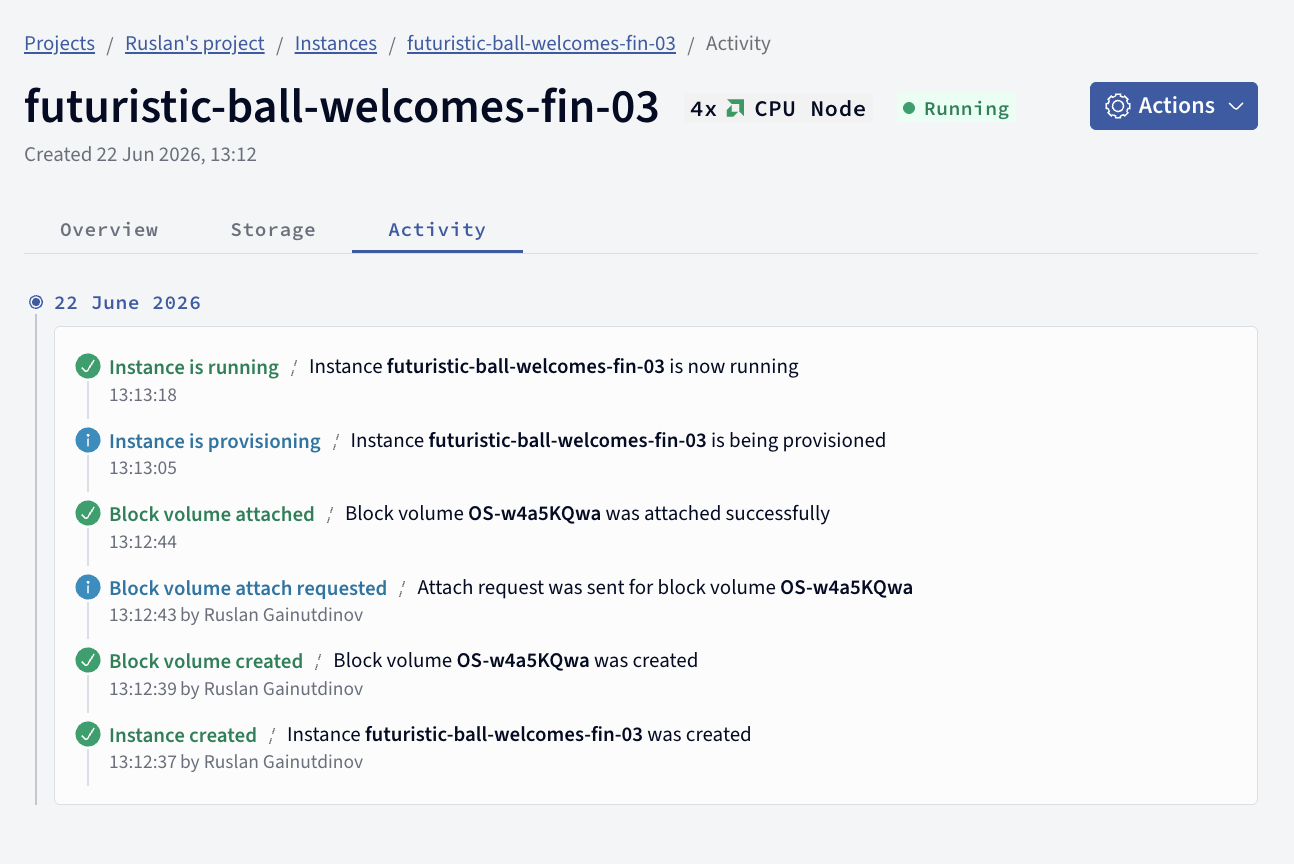
We added an Activity tab to the instance and instant cluster overview. Open any instance or instant cluster in the console and select Activity to see a history of its lifecycle events: when it was created, provisioned, and started running, along with block volume and shared filesystem attach and detach events. Each entry records when it happened and, where applicable, who triggered it.
April 2026
Deprecated
HDD based services
It is no longer possible to create instances and volumes based on HDD. NVMe provides better performance for AI/ML workloads.
Existing HDD volumes can't be extended. Please reach out to our customer support if you need help with the existing HDD based services.
March 2026
Improvements
Cross-datacenter volume cloning now available for all customers
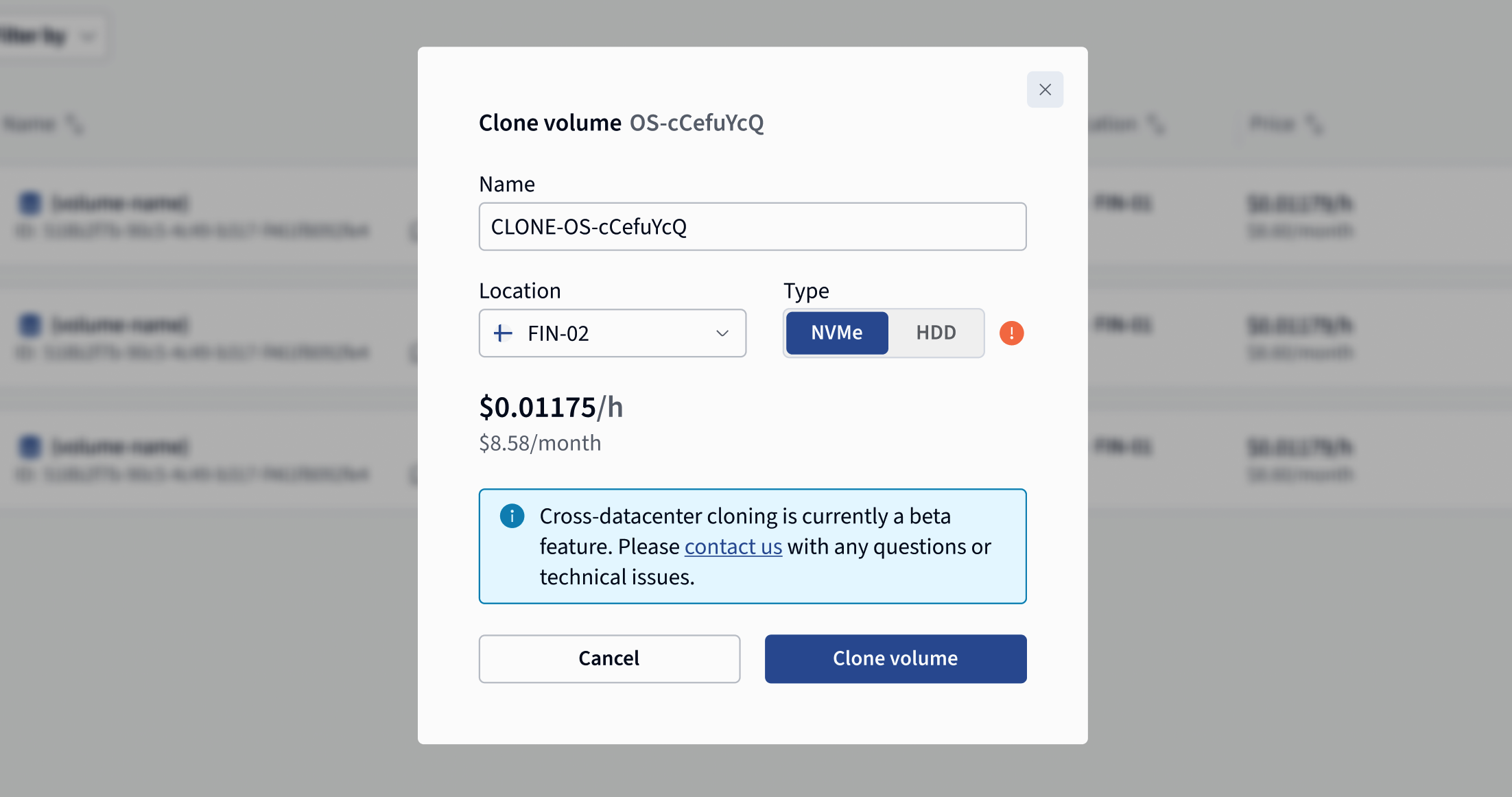
You can now clone your OS and data volumes across data centers. This makes it easy to replicate your environment in a different location. Read more about block volume cloning.
SEPA transfers for topping up balance
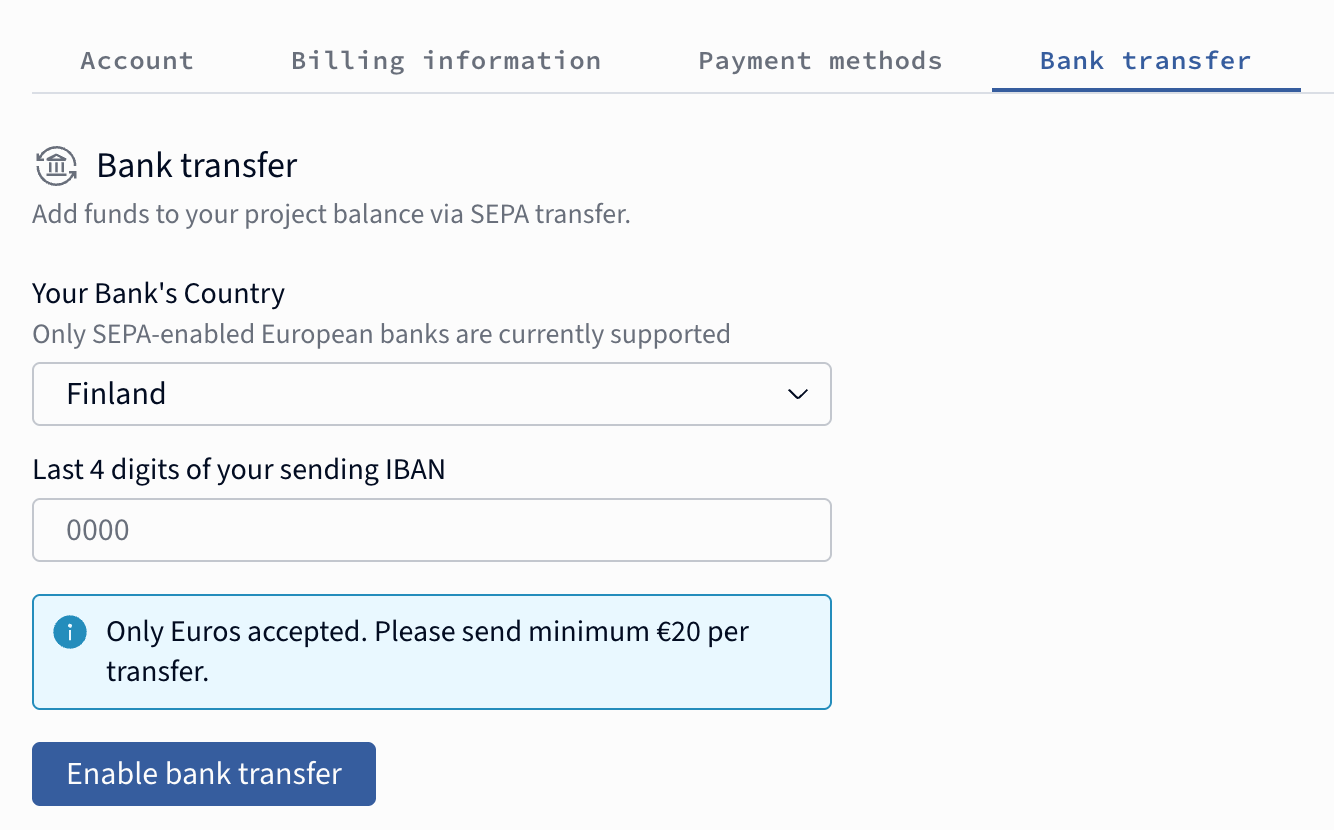
It is now possible to top up the balance using bank transfer from SEPA-enabled bank.
Confidential Computing
Added support for NVIDIA Confidential Computing–based instances, now available by request, enabling hardware-level protection for data, AI models, and in-memory operations. These Confidential VMs isolate workloads from the host hypervisor, removing the need to trust the cloud provider. Check out the documentation: Confidential Computing.
February 2026
New products
Instant GPU Clusters Generally Available
The Beta label has been removed from clusters, marking their general availability. Users can also now transfer clusters between projects, matching the flexibility that already existed for instances.
Improvements
Spot Eviction Storage Behaviour Controls
Users can now configure what happens to their attached storage when a spot instance is evicted — for example, whether volumes are retained or released. This gives teams more control over data safety and cost when running interruptible workloads. See API notes here.
Info
2026-03-03 Introduced changes to API
2026-03-05 Python SDK improved (v1.20.0)
SFS Share Settings Improved
The shared filesystem (SFS storage) share settings modal received a round of UX improvements, and the displayed mount command was updated to reflect the latest syntax — ensuring users copy the correct command when attaching volumes to instances.
January 2026
New products
Terraform Provider for Verda Infrastructure (GA)
Users can now manage their entire Verda infrastructure as code (IaC) using the official Terraform provider, enabling reproducible deployments, version-controlled configurations, and seamless integration with existing IaC workflows. For more information, check out the official documentation or visit the GitHub repository.
Container Registry (Limited Beta)
A built-in container registry that lets users store, manage, and deploy container images directly within the platform, eliminating the need for third-party registry services.
Cluster Auto-scaler for Kubernetes (Under review)
An auto-scaler integration currently under review by the official Kubernetes project that would allow Verda-based clusters to automatically scale node pools up and down based on workload demand, optimizing both performance and cost.
Improvements
Unified Top-Up Page
Combines One-time top-up, Automatic top-up, and Credit coupon forms into a single, streamlined page, simplifying the payment experience.
Transfer Money Between Projects
Users can now move funds between their projects, adding important flexibility to multi-project billing workflows.
Around ~90 other smaller improvements and bug-fixes across 27 releases to Cloud Platform.