Audit logs
The audit log is a per-project record of what happened to your resources: instances deployed and deleted, volumes attached and resized, SSH keys added, team members invited, balance topped up, and account security events such as sign-ins. Each event says what happened, which object it happened to, who did it, when, and for several event types the client and IP address behind the request.
Events use the CloudEvents 1.0 JSON format, so you can send them to a SIEM or log pipeline without writing a Verda-specific parser.
-
Supported events lists the areas the log covers today and the fields worth knowing.
-
Public API covers the endpoints, filters, cursor pagination, and the JSON export.
Info
Audit logs are in Beta. The CloudEvents аield names, object types, action types and data payload may change as event coverage grows.
View the audit logs in the console
Open a project in the Verda Console and select Audit logs under Project management.
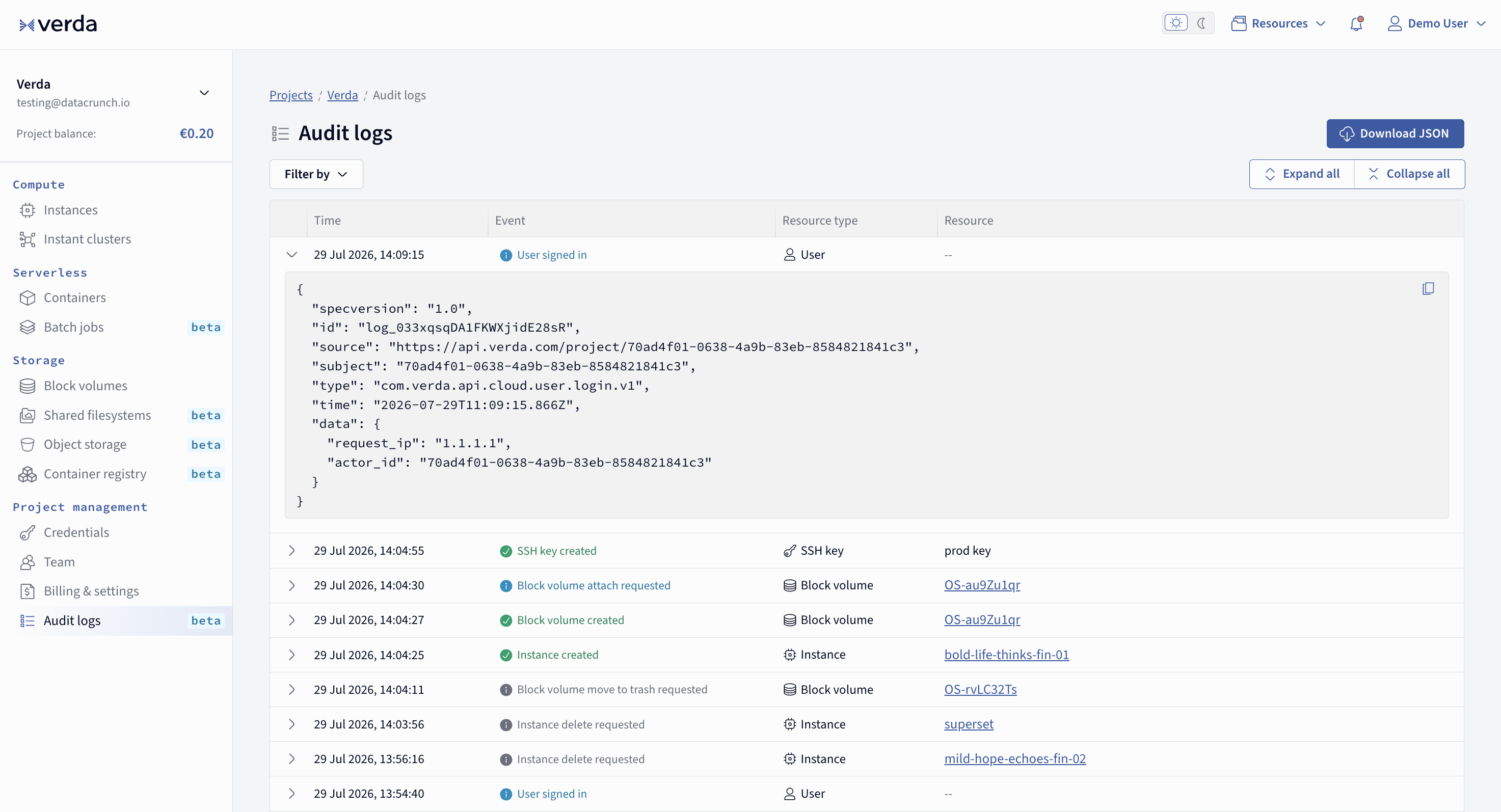
The table lists events newest first, with the time, what happened, and the resource involved.
- Filter by narrows the list by resource type and event.
- Select a row, or use Expand all, to see the raw CloudEvents JSON behind the entry. The copy button in the corner of the JSON block copies the event.
- Download JSON exports the log as a single file. It downloads the full 90 day log, not only the rows matching the filters you have applied. To export a narrower slice, use the API, which takes the same filters as the read endpoint. See Exporting to a JSON file.
Who can access the audit logs
The project owner and members with the admin role can read and export the audit log. Members with the developer role cannot: requests made with their credentials return 403 Forbidden. See Role permissions.
The audit logs are scoped to a single project. When you call the API, the project comes from the Cloud API credentials you authenticate with, so credentials created in one project never read another project's logs.
Retention period
Both the console and the API read a 90 day window. A request with a start_date older than 90 days returns 400 Bad Request, and a request without dates returns everything from 90 days ago up to now.
To keep events for longer, export them on a schedule and store the files yourself. See Exporting to a JSON file.
Event format
Every event carries the CloudEvents envelope (specversion, id, source, type, subject, time) plus a data payload describing the action:
{
  "specversion": "1.0",
  "id": "log_033yHNElgkrExnfoXtbzzU",
  "source": "https://api.verda.com/project/7c9e6a41-2f8b-4d3e-9a15-0b6c4d2e8f37",
  "subject": "4a1f8c73-9e52-4b7d-8f01-2c6d5b3a9e84",
  "type": "com.verda.api.cloud.compute.create.v1",
  "time": "2026-07-30T05:08:41.616Z",
  "data": {
    "contract": "PAY_AS_YOU_GO",
    "hostname": "calm-river-listens-fin-01",
    "instance_type": "CPU.4V.16G",
    "location_code": "FIN-01",
    "request_ip": "1.1.1.1",
    "request_origin": "console-11.67.0",
    "actor_id": "5bbb59cb-fced-44a4-85c6-5005e7480a8f",
    "compute": {
      "id": "4a1f8c73-9e52-4b7d-8f01-2c6d5b3a9e84",
      "hostname": "calm-river-listens-fin-01",
      "instance_type": "CPU.4V.16G",
      "ip": "8.8.8.8",
      "os_volume_id": "8d2c5f90-3b71-4e68-9c04-1af7b6e5d213",
      "location_code": "FIN-01",
      "is_cluster": false
    }
  }
}
typefollows the patterncom.verda.api.<producer>.<object_type>.<action>.v1. The producer is the system the event came from:cloudcovers actions taken through the console, the API, the CLI, and the SDKs.subjectis the id of the object the event is about: a resource id for most events, the user id for account security events, the client id for Cloud API credential events, and the code itself for coupon events.sourceidentifies the project the event belongs to.dataembeds the object itself for compute, volume, and SSH key events, and references other related objects by id, for examplecompute_idon a volume attach event.actor_idis the user who performed the action. It is absent when the platform acted on its own, for example when a spot instance is evicted or an automatic top-up runs, so the log is not limited to your own API calls.request_ipis the client IP the call came from, andrequest_originsays what made it:public-api-v1for a call with an API token, orconsole-<version>for an action taken in the console. Instance, cluster and volume events carry this metadata, with more events reporting them in the future releases.
Auth events
Sign-in, sign-out, password reset, and two-factor events belong to a user account rather than to one project. Verda provides them for each of them for every project that user is a member of at the time of the event. This makes them visible to a project's owner and admins. This is on par with cloud API credentials login, which are project-scoped and cloud API auth and actions visible in the audit logs of the project they are used in.
Warning
If you are a member of a project, project owner and admins can see when you signed in to Verda Cloud console, from which IP address, and with which client. After you leave a project your later sign-ins no longer appear in its log, while events already recorded stay there.
What is not supported yet
Check the Supported events page for the latest list of supported events. The following functionality available in the console and public API does not generate events yet:
- Transfers out of a project. When an instance or a volume moves between projects, the
transferevent lands in the project that receives it. The project it left records nothing. - Serverless containers and batch jobs. Deployments, scaling, and deletions are not recorded.
- Container registry, inference keys, and container registry credentials. Creating and deleting them is not recorded.
We are adding these in later releases. Until then, treat a missing event as missing coverage rather than as evidence that nothing happened.