Confidential Computing
Info
Verda now offers Confidential Computing on RTX PRO 6000, B200, and B300 GPUs and on AMD CPU-only instances. If you need more capacity, reach out to us.
Confidential Computing (CC) protects data in use, while it is actively being processed in memory, not just at rest on disk or in transit over the network. Verda Confidential VMs (CVMs) run inside a hardware-enforced Trusted Execution Environment (TEE) that encrypts both CPU and GPU memory and cryptographically isolates your workload from the hypervisor and the cloud provider. Even Verda's own infrastructure cannot read plaintext data inside a running CVM.
Confidential Computing instances cannot reboot from inside the guest
A running CVM has no firmware/bootloader to re-measure it, so an in-guest reboot (or shutdown -r) will not bring the instance back up. To restart a CVM, use the Verda console (or API): Shutdown, then Start. Each boot is freshly measured and attestable.
How it works
- AMD SEV-SNP (CPU): each CVM gets a unique AES-128 memory encryption key managed exclusively by the AMD Secure Processor (AMD-SP), an on-chip security co-processor the hypervisor cannot access. SEV-SNP adds memory integrity protection via the Reverse Map Table (RMP), which prevents the hypervisor from replaying, remapping, or corrupting guest memory pages. CPU register state is additionally encrypted on every hypervisor exit (SEV-ES).
- Intel TDX (CPU): on Intel hosts each CVM is a Trust Domain (TD). Its memory is encrypted with a per-TD key by the memory controller, and the Intel TDX module, Intel-signed code running in a dedicated CPU mode (SEAM), sits between the hypervisor and the TD: the hypervisor can schedule and stop the TD but never reads its memory or registers. The TDX module also keeps the TD's measurement registers (MRTD for the firmware, RTMR0-3 for the boot chain) and produces the signed report behind every quote.
- NVIDIA Confidential Computing (GPU): the Blackwell GPUs listed in Supported Hardware run in CC mode with all ingress and egress paths protected by AES-256-GCM encryption. GPU memory is isolated from the host. NVIDIA firmware verifies its own integrity at boot via an on-die hardware Root of Trust before the GPU accepts any workload.
- Encrypted PCIe transfers: data moving between the CVM and the GPU passes through bounce buffers. Payloads are AES-GCM-encrypted inside the CVM, staged through a shared PCIe buffer, and decrypted only once inside GPU-protected memory. A rolling 96-bit IV and an AES-GCM AuthTag prevent replay and tampering on the bus.
- Trust boundary: the TEE perimeter encloses the CVM and the GPU's protected memory. The KVM/QEMU hypervisor, host OS, cloud management software, and all other VMs sit outside this boundary and are treated as untrusted.
- Measured boot (direct kernel boot): Verda launches each CVM with QEMU direct kernel boot (
-kernel/-initrd/-append) and SEV-SNP kernel hashes enabled, so a SHA-384 digest of the OVMF firmware, kernel, initramfs, and kernel command line is folded into the SEV-SNP launch measurement. The attestation report therefore covers your exact boot chain: not only that the hardware is genuine, but that the firmware, kernel and initrd that booted are the ones you expect. You can recompute and verify this yourself, including the exact firmware (a Verda-built AmdSev OVMF version, see OVMF). - Attestation: before any workload runs, you can cryptographically verify the full stack. The CPU (AMD SEV-SNP or Intel TDX) and the GPU are attested independently; see System Attestation for what each flow proves and how to run it.
Architecture
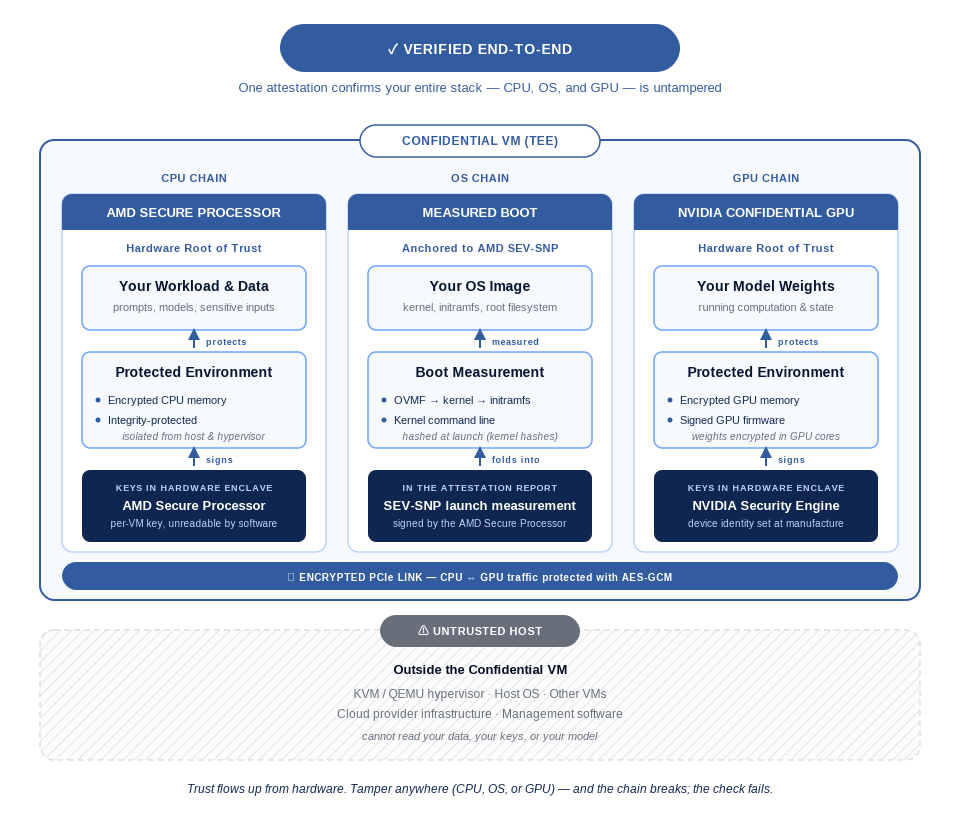
The AMD-SP hardware and the CVM (including its assigned GPU) are the only trusted components. The hypervisor can schedule and terminate the VM but cannot read its memory or register state. Verda's management plane is outside the trust boundary and has no access to plaintext data or decryption keys.
Supported Hardware
Verda currently supports confidential computing on the following hardware:
| Hardware | Size | AMD SEV-SNP | Intel TDX |
|---|---|---|---|
| NVIDIA RTX PRO 6000 | Single GPU | Available | — |
| NVIDIA B200 | Multi GPU | Available | Available |
| NVIDIA B300 | Multi GPU | Available | Available |
| CPU-only | up to 360x | Available | — |